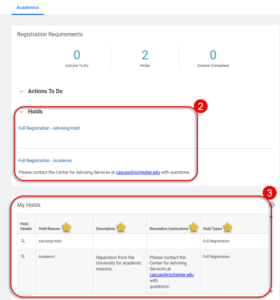
View Holds
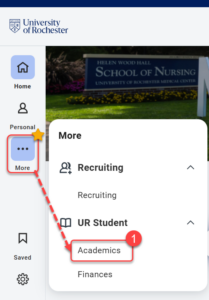
- Log into UR Student, then navigate to the Academics app under UR Student in the global menu.
TIP: If you cannot see UR Student in the global menu, click the More icon.
IMPORTANT: Holds on your student account prevent you from performing certain tasks, such as registering for a Course Section. To have the Hold lifted, you need to complete a series of actions, but these depend on the type of Hold applied. There are different types of Holds, but you can view them all, and their resolution Instructions, following these steps in UR Student.
- Some Holds affect registration such as Academic and Advising Holds; a Transcript Hold does not affect registration.
- The My Holds section of the Academic page explains the details of Holds on your account and how to resolve them.
- Hold Reason
- Description
- Resolution Instructions
- Hold Types