Overview
Use UR Student to review your Program of Study (POS) and monitor your progress against your educational objectives.
Background
What is a Primary Program of Study? Each student’s academic record in the UR Student system must have one and only one primary program of study. For a graduate student, it is the program to which the student has been admitted. Additional programs of study can be added for items such as certificates after the student has been matriculated in to their primary program of study, based on individual school and program requirements. For an undergraduate student, this is typically their first declared major or their first intended major upon admission (taken from a student’s application and their first designated area of interest).
For questions regarding which program is your primary program of study, please contact your Registrar or Advising office.
View Student Profile
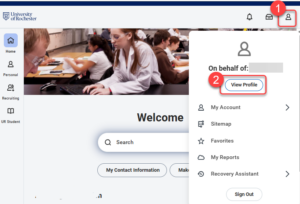
- Log into UR Student, then select your thumbnail image.
- Select View Profile.
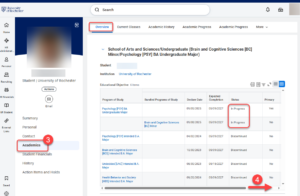
- Select Academics. The overview tab shows your In Progress and past Programs of Study.
- Scroll to the right to view all the columns.