Overview
Use these instructions to update privacy settings.
Manage My Privacy Settings
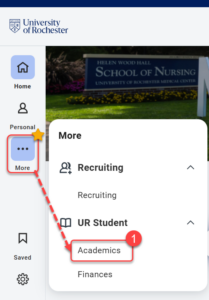
- Log into UR Student, then navigate to the Academics app under UR Student in the global menu.
TIP: If you cannot see UR Student in the global menu, click the More icon.
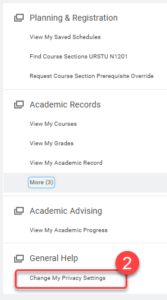
- On the Academics page, find General Help on the menu on the right side, then select Change My Privacy Settings.
- Select “I don’t consent to share my information outside of this institution” only if you wish requests for information from individuals or entitities not affiliated to the University of Rochester to be refused. This is a full block, and is also inclusive of the directory information below.
- Select “I don’t want my directory information to be public” if you do not wish for your public student directory information to be available. The Public Student Directory includes name, pronouns, phonetic pronunciation, audio pronunciation, photo, institution, and social media links.
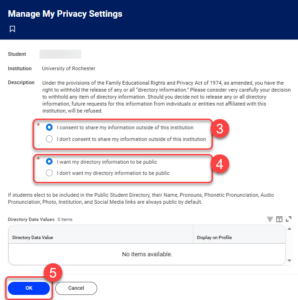
- Select OK to complete the task.