Pricing
Black and White Printing:
1-sided prints will cost $.10 each
2-sided prints will cost $.18 each
Color Printing:
1-sided prints will cost $.25 each
2-sided prints will cost $.48 each
This pricing includes New York State sales tax.
Paying for Printing
| Rocky Bucks Accounts on ID Cards |
|---|
| Students or employees with Rocky Bucks accounts can swipe their URochester ID badge at printers and have deductions made from their Rocky Bucks balance for each page printed, and can see that balance at the printer each time the badge is swiped.
To add funds to a Rocky Bucks account online via credit card, visit eAccounts. Click the “Sign In” button and then log in with your UR Account. Grad Students and University employees can sign in and fill out this form to request a Transact account and get Rocky Bucks added to their badge. To top off with cash or a credit card, visit a Transact Kiosk – see below for locations |
| Setting Up Staff for Printing to PaperCut |
| In lieu of the previous workflow of department copy cards, accounts will now (starting Fall 2026) be assigned directly to users within PaperCut, accessed by swiping their URochester ID badge at the printer.
Assigning a FAO(s) to staff URochester ID badges provides University departments with the ability to direct print & copy charges for any faculty or staff to the appropriate account, and to have reports include details at not only the account level, but also the user level. When a user with access to one or more FAO accounts swipes their URochester ID badge to access a PaperCut printer, they will select/confirm the appropriate account during that session. Pricing will reflect the current rate for the device used. All prices quoted on these pages are specific to Print Program devices, not those with a department-funded lease. To assign FAOs to staff or make a change to current FAOs assigned, contact the IT Help Desk at 275-2000 or submit a request online. |
| Visitor Cards |
| There are two types of Visitor Cards. They may be used for printing only from a University-managed computer intended for Visitor or shared account use. Printing via Visitor Card is not supported from a personally owned computer. Any staffed IT help desk can assist you with printing should you need to pay with Visitor Funds.
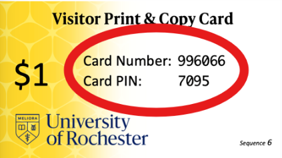
Business card type Visitor Print & Copy cards are available in $1 and $5 denominations from some service desks. These are only usable for print & copy.
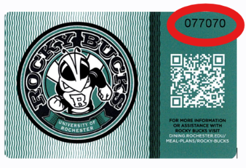
Plastic mag-stripe Visitor Cards can be purchased in preloaded $5 denominations at the following locations:
Anyone can also purchase a Visitor Card from a Transact PayKiosk (see below), with a minimum funding amount of $25. The plastic mag stripe Visitor Card can also be used at University vending and dining locations. |
| Transact Kiosk Locations |
| Visit a Transact Kiosk to add funds to your Rocky Bucks from cash or card, or to purchase a reloadable Visitor Card. There is a minimum funding amount via credit card of $25. Cash is accepted in bills of any amount.
Locations:
|