Page Contents
- Overview
- Understanding Your Address Data in UR Student
- Updating Your Address in UR Student
- Updating Where You Live
- How your address data flows to other campus systems
Overview
As a student, you can have multiple addresses in the system. Use this as guide to understand your address data in UR Student, update your address and/or learn about how your address data flows to other systems.
Understanding Your Address Data in UR Student
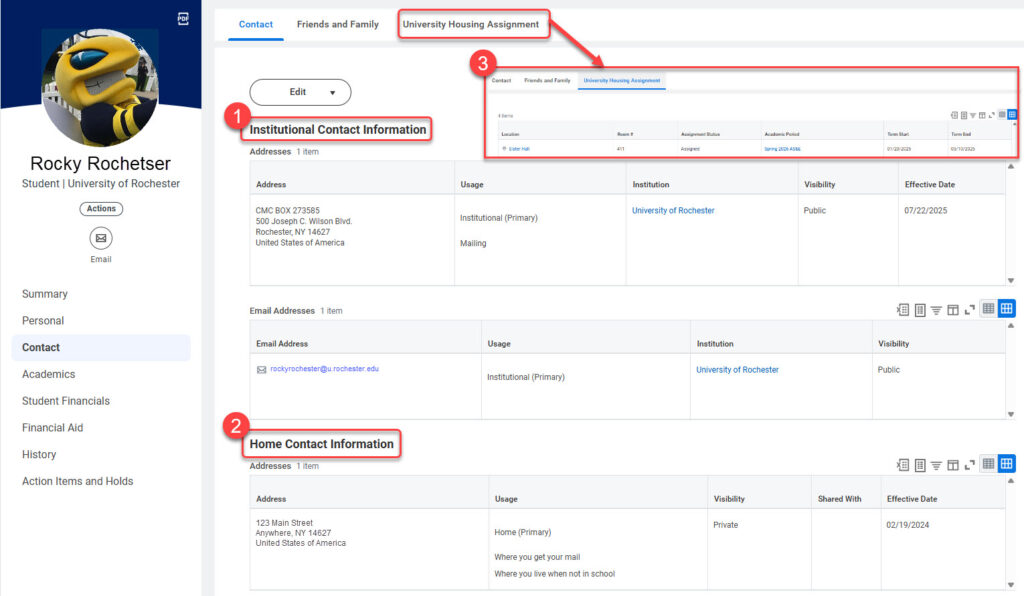
To access your address information in UR Student, click on your Profile picture or the cloud icon at the top right of the page after logging in, then select View Profile.
TIP: If you are also an Employee or a funded Grad Student, you will need to select your name under the word Student on the first page you see, then select Contact on the left-hand side to view your address information. Available address information may include:
- Institutional Contact Information – Your On Campus Mailbox at the Campus Mail Center (CMC) or other campus location. This address will be considered your Mailing Address (See the “Where You Get Your Mail” section below for details), if assigned and will be loaded into the system on your behalf.
- Your University Housing Assignment (specific to a term) – This address will be considered your residential address while at school ( See the “Where I Live While at School” section below for details) for any term in which you have a housing assignment and is loaded into the system on your behalf each term.
- Home Contact Information – maintained by you! Originally populated from your application.
- You should have the following addresses always stored in the system:
- Where You Live When Not in School – your permanent address, required for all students. A U.S.-based address.
- Where you Live When Not in School, if outside the USA – your permanent address, outside the USA. International students may have both a permanent address within the U.S. as well as a permanent address in their home country.
- Where You Live While in School – your residence during the academic term. Only complete if you do not live in University housing.
- Where You Get Your Mail– your mailing address during the academic term. Only complete if you do not have an assigned mailbox on the River Campus, Eastman or the Medical School (visible in the Institutional Contact section of your Contacts page).
- Student – Billing – Optional – Only complete if you have opted out of receiving 1098-Ts electronically or if you are an ECMS student.
- Student Refunds – Optional – The address to which a student refund check will be mailed, when present, instead of the Campus Mail Center or Primary Home Address.
- Diploma Address – Optional – The address to which you would like your Diploma mailed
IMPORTANT: If you are a student employee or a graduate student receiving a stipend, and you do NOT have a Campus mailbox, your paycheck will be mailed to the Home Address flagged as Primary. Edit or add the desired address, then select the Primary Box to set this designation.
Updating Your Address in UR Student
Students can update contact information at any time in UR Student. It is important to keep updated the “Where You Live While in School” and “Where You Live While Not in School” addresses updated for both domestic and international sponsored students. Follow the steps below to update an address in UR Student:
-
- Log into UR Student using your Active Directory account and password.
- Select your Profile picture or the cloud icon in the upper right corner of the home page.
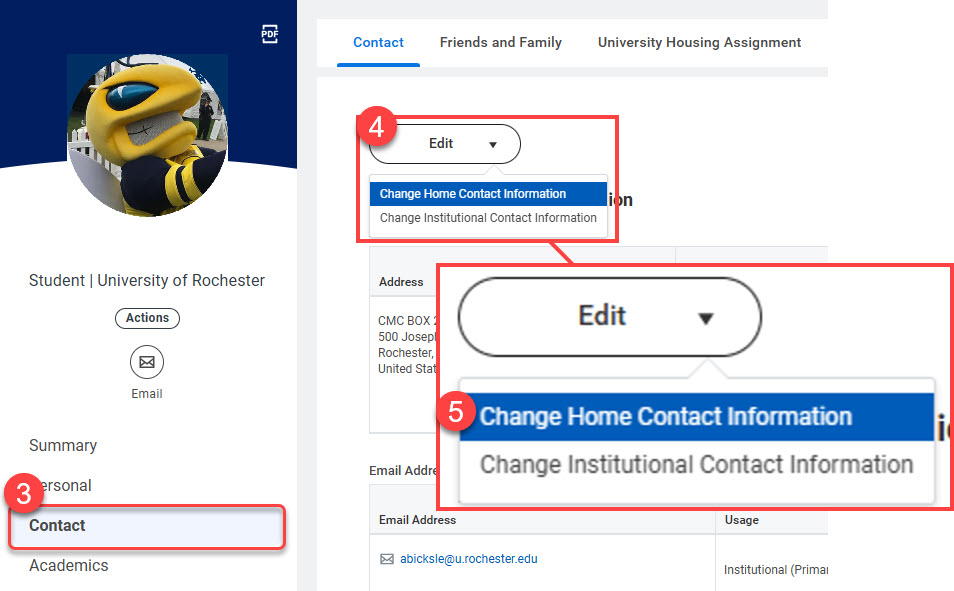
- From the student Profile page, select Contact from the right menu options.TIP: If you are also an Employee or a funded Grad Student, you will need to select your name under the word Student on the first page you see, then select Contact on the left-hand side to view or edit your address information.
- Select Edit above Home Contact Information to update, add or delete your personal addresses listed.
- Select the Change Home Contact Information drop-down.
IMPORTANT: Two address types are needed for all students – Where You Live While in School and Where You Live When Not in School. When at school and not living in University housing, students need both address types updated in UR Student even if they are the same.
TIP: Students that have a University Housing Assignment will use that instead of their Where You Live While in School address. If you have a Campus Mail Center (CMC) box, this will be used instead of your Where you get Your Mail address. These are automatically populated in UR Student and cannot be changed you.
Updating Where You Live
- On the Change Home Contact Information screen:
- Select the
 icon to edit
 - Select the
 icon to delete.
- Select the
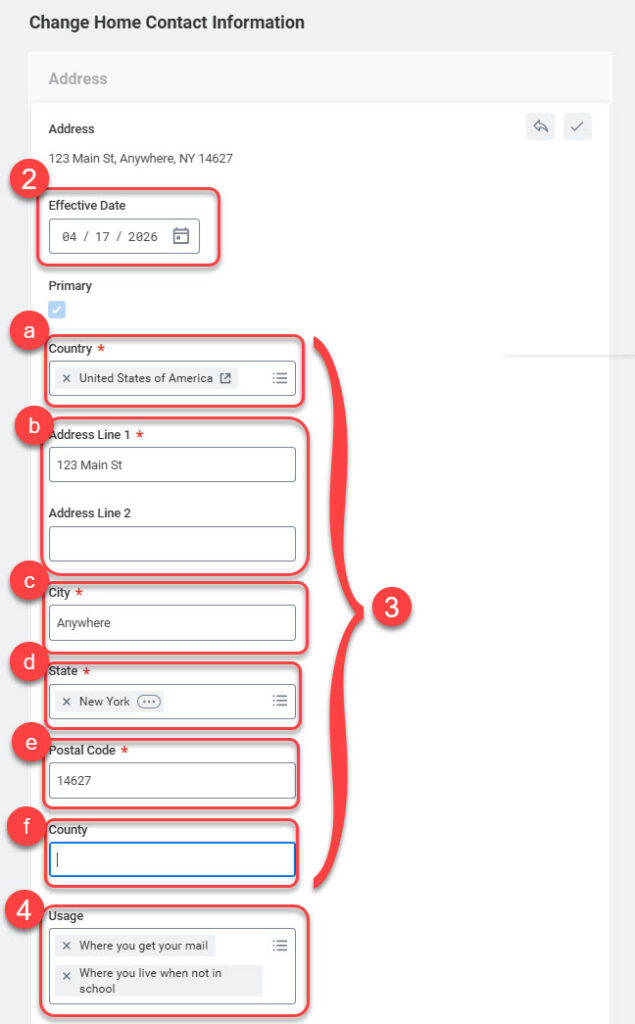
- When editing an address, keep the Effective Date as the current date.
- Update address fields as needed:
- Country
- Address Line 1 and/or 2
- City
- State
- Postal Code
- County
- Within the Usage field, select the correct description for the address:
-
- Diploma address
- Student – Billing
- Student Refunds
- Where you get your mail
- Where you live when not in school
- Where you live when not in school, if outside of the USA
- Where you live while at school
IMPORTANT: When a Third Party Delegate’s billing address changes, update your Third Party Delegate from the Friends and Family tab.
-
- When finished, select the
 icon to accept changes or the
  icon to exit Edit Mode without saving.
 - Select the Add button to enter additional addresses following steps 2 through 5 above.
- When all updates are complete, select one of the following buttons:
- Submit to save all updates.
- Save for Later to finish at another time.
- Cancel then Discard to return to the Contact tab.

How your address data flows to other campus systems
The address data that you maintain in UR Student is sent to other campus-based systems, such as JobLink or Glacier. Understanding how this data is sent will help you update your address correctly in UR Student such that these other systems receive your data as you intend.
The system looks for an address to send in the following sequence for both home and mailing address. Once an address has been found that qualifies, that address will be sent to other campus systems on your behalf.
Home Address
- If you have a university housing assignment visible on the University Housing Assignment page of your Contacts tab with an Assigned status for the current term, the address of your building/room or apartment will be sent.
- If you have a home address with a usage of ‘Where You Live While in School,’ visible in the Home Address section of your Contacts tab, this address will be sent.
- Your primary home address will be sent. This is the address visible in the Home Address section of your Contacts tab with the primary flag set to yes.
Mailing Address
- If you have a CMC, Eastman or Medical Center post office box, visible in the Institutional Address section of your Contacts tab, the address of your mailbox will be sent.
- If you have a home address with a usage of ‘Where You Get Your Mail,’ visible in the Home Address section of your Contacts tab, this address will be sent.
- Your primary home address will be sent. This is the address visible in the Home Address section of your Contacts tab with the primary flag set to yes.