Overview
Sometimes course registration does not go as smoothly as you would like. If you have tried to register for courses and are experiencing problems, here are some tips on troubleshooting the process. If you are still having issues registering for courses, please contact the registrar at registrar@rochester.edu or (585) 275-8131.
Troubleshoot Registration for a Course
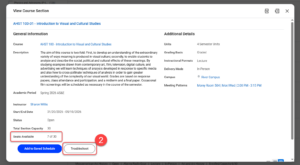
- Through the Find Course Sections URSTU N1201 report, select the course section you are trying to troubleshoot.
TIP: If you are not familiar with the Find Course Sections URSTU N1201 report, please refer to the Find Course Section web page. - From the View Course Section pop-up or screen, check if there are seats available in the course. If there are still seats available, select Troubleshoot.
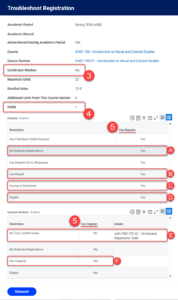
- Enrollment Window: “Yes” means that registration is open. “No” means that registration is closed.
- Holds: If you have a Hold, select the number to view Holds.
- Review Can Register columns in the Course and Course Section tables.
- If all lines in the column = Yes, there are no registration issues.
- No Duplicate Registrations = No, means you have taken the course before.
- If you have previously taken the course, Can Repeat will indicate whether or not you are allowed to register again.
- Access to Enrollment = No, see your school’s Registrar to register.
- Eligible = No, you have not completed requirements and need instructor permission or to be enrolled in a specific Program or class year (See Request Permissions to Register for a Course video for more instructions).
- No Time Conflict Exists = No, resolve the conflict.
- Has Capacity = No, means course section is full.
- If you cannot resolve the issues on your own, contact your Advisor or Registrar for help.